Turn Your Old Phone Into a Dash Cam: A Budget-Friendly Road Safety Solution
Turn Your Old Phone Into a Dash Cam: A Budget-Friendly Road Safety Solution
Save Money and Record Every Drive With Just a Few Simple Accessories
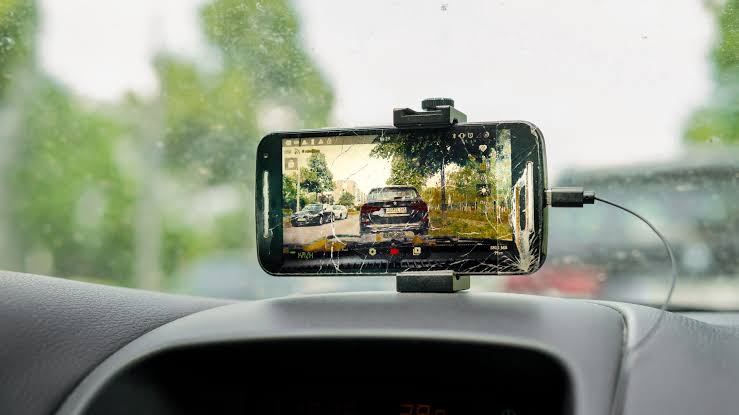
Dash cams are becoming increasingly popular among drivers for recording road trips and providing evidence during accidents or insurance disputes. However, purchasing a dedicated dash cam can be costly. A simple and affordable alternative is to convert an old smartphone into a fully functional dash cam.
With the help of a dash cam app and a few basic accessories, drivers can easily set up their phones to record journeys without spending extra money.

How To Use Your Phone As a Dash Cam
To get started, users need to download a reliable dash cam application such as Droid Dashcam. These apps usually offer useful features including GPS tracking, timestamps, speed monitoring, and automatic recording when the vehicle starts moving. Some apps can also continue recording in the background while allowing calls to come through.

A sturdy phone mount is also important to keep the device stable and ensure a clear road view while driving. Affordable mounts are widely available online.
Since continuous recording consumes battery quickly, drivers should keep the phone connected to a charging cable throughout the journey.
Once the app is installed and the phone is mounted securely on the dashboard, users simply need to launch the app and begin recording.
Basic Items Required
- An old smartphone or spare phone
- A dash cam app like Droid Dashcam
- A phone mount
- A charging cable
Advantages of Using a Phone as a Dash Cam
- Cost-effective option compared to buying a dedicated dash cam
- Easy access to recorded videos for playback or cloud upload
- Many apps provide advanced features similar to professional dash cams
Disadvantages to Keep in Mind
- A visible phone inside the car may attract thieves
- Smartphones can appear bulky on the dashboard
- Older phones may not offer clear night recording or high-quality video
Frequently Asked Questions
Is it legal to use a phone as a dash cam?
Yes, but drivers should follow local traffic rules. The phone must be mounted properly, and drivers should avoid touching it while driving.
Are dash cam apps free?
Most apps are free to download, though some premium versions offer extra features and remove advertisements.
Does the phone need a SIM card?
No. A SIM card is not necessary for recording. Videos can later be uploaded through Wi-Fi.
Final Take
Turning an old phone into a dash cam is a practical and low-cost solution for drivers who want basic road recording features without investing in expensive equipment. While it may not completely match the performance of professional dash cams, it remains a smart option for everyday use.